Passyble Download

Passwords, 2FA codes and passkeys

Every password, happily remembered.

Passyble keeps your logins, one-time codes and passkeys together in one end-to-end encrypted vault, and fills them in for you on Windows, on Android and in your browser. No Passyble account, no Passyble cloud. Just you and your keys.

  • No account with us
  • Encrypted on your device
  • No ads, no tracking
The Passyble app for Windows: the vault list on the left, and a GitHub login open on the right with its username, hidden password and a live 2FA code (demo data).
Passyble for Android: the vault list with search, filters and letter avatars (demo data, a mockup of the app's design).
The good stuff

Everything you need to sign in, and nothing you don't

Passyble does the remembering and the typing, so you can get on with your day.

  • Fills it in for you

    Android autofill with keyboard suggestions, an inline menu in your browser, and a hotkey that types logins into Windows apps.

  • 2FA codes, right on time

    The code lives with the login and is filled right after the password. If it can't be filled, a popup or notification shows it with a Copy button.

  • Passkeys that travel

    Create and use passkeys on Android and in the browser. They sync with the vault, so a passkey made on your phone works on your PC.

  • Sync your way

    Keep the encrypted vault on a WebDAV server like Nextcloud, in a OneDrive, Dropbox or Syncthing folder, in your own Google Drive, or on your own Passyble Server.

  • More than passwords

    Secure notes, payment cards, identities for address forms, custom fields, tags, and a trash that keeps deleted items for 30 days.

  • A friendly check-up

    Finds weak, reused and old passwords. The optional breach check sends only the first 5 characters of a password's hash.

  • Moving in is easy

    Bring your logins from Chrome, Edge, Firefox, Safari, Bitwarden, 1Password, Proton Pass, KeePassXC, LastPass, Dashlane and common 2FA apps. Files are read on your device.

  • Speaks your language

    English, Spanish, French, German, Simplified Chinese, Japanese, Korean, Hindi and Indonesian.

One vault, three homes

At home on your PC, your phone and your browser

Every screenshot here shows a made-up demo vault, so feel free to look closely.

Windows

A calm, tidy home for every login

The Windows app keeps your vault and does all the decryption. Find anything in a keystroke, make strong passwords on the spot, and see which ones need some love.

  • A global hotkey that types logins into Windows apps
  • Windows Hello unlock and a handy tray icon
  • A 2FA code popup with a Copy button
  • An optional Windows 11 passkey provider
Adding a new login in the Windows app, with the password generator open: length slider, character options and a freshly generated password (demo data).
Password health in the Windows app: 10 passwords checked, one weak and one old, with an optional breach check (demo data).
Browser extension

Sign-in forms, filled with one click

The extension for Chrome, Edge, Brave and Firefox on Windows works together with the Windows app. It offers the right login right in the form, and the popup is there for everything else.

  • An inline menu under the sign-in field
  • The 2FA code filled right after the password
  • One login at a time, and only for the site it is saved for
A sign-in page with the Passyble inline menu open under the email field, offering two saved logins for the site (demo data).
Android

Your logins, right where your thumb is

Passyble for Android 9 and later fills apps and websites through Android's own autofill, with suggestions right on your keyboard.

  • Keyboard suggestions, one tap to fill
  • A one-time code notification with Copy
  • Biometric unlock
  • Passkeys through Credential Manager on Android 14 and later
The Android vault list with search, filter chips and a starred favorite (demo data).
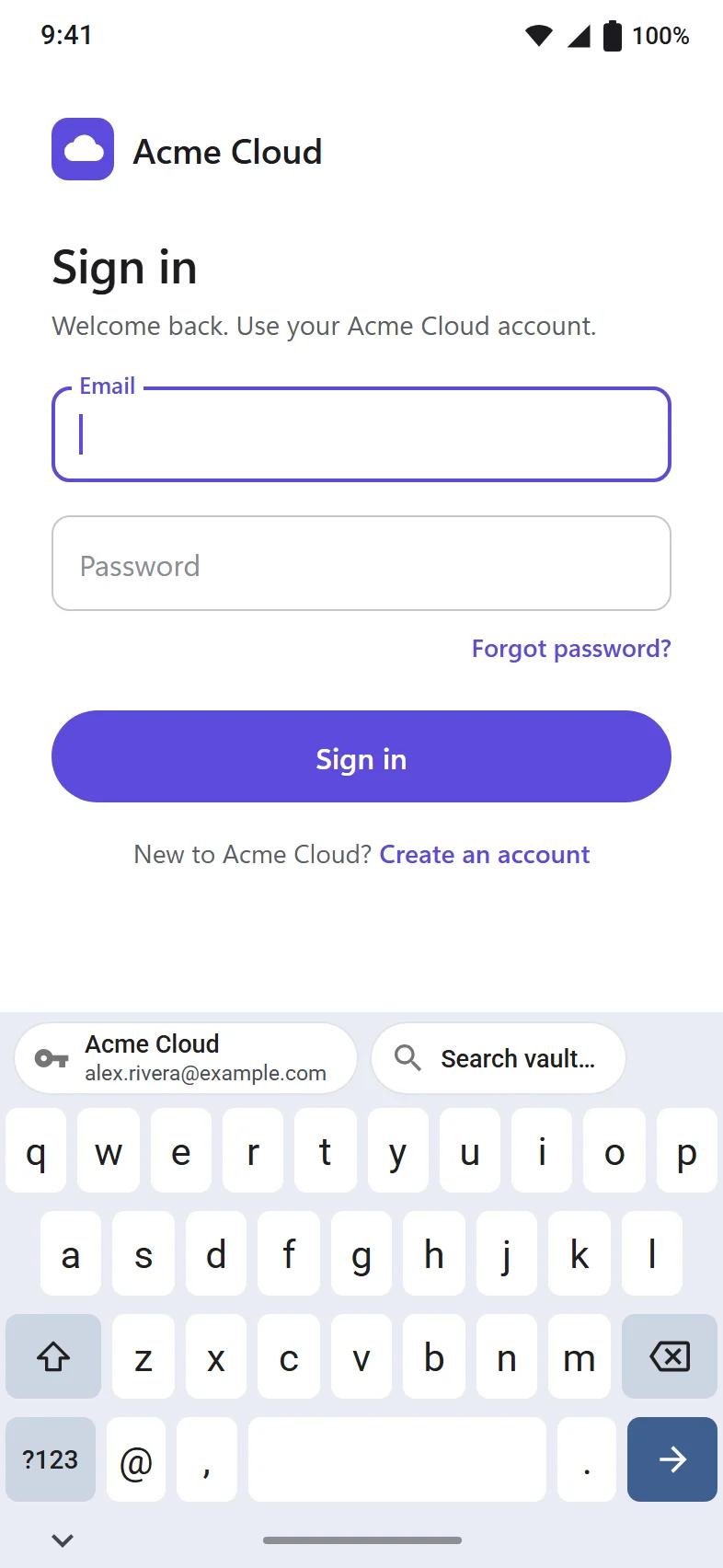
Android autofill: a sign-in screen with a Passyble login suggestion shown on the keyboard (demo data).
A GitHub login on Android with username, hidden password and a one-time code with its countdown ring (demo data).

The Android screens are design mockups of the app, with demo data.

Plain words, no fine print

How your data stays yours

You shouldn't need a degree in cryptography to trust your password manager. Here is the whole idea.

  1. It's locked before it goes anywhere

    Your master password turns into a key on your device (Argon2id). That key protects a random vault key, and every item is encrypted with it (XChaCha20-Poly1305). Your master password never leaves your device.

  2. You choose where it lives

    Wherever you sync the vault file (your WebDAV server, a cloud folder, your Google Drive or your Passyble Server), that place only ever gets the encrypted file. Sensyble never gets it at all.

  3. We don't know who you are

    There is no Sensyble account, no Sensyble server for your data, no analytics and no advertising.

  4. Each site gets only its own login

    On Windows, the browser extension gets one login at a time, and only for the site it is saved for. The desktop app checks that for every request.

  5. Forgot your master password?

    We can't reset it, because we never have it. You can make an optional recovery code ahead of time and keep it offline.

An honest note: Passyble is pre-release and has not had an independent security audit yet. Everything Passyble sends, to whom, and how to delete your data is in the privacy policy.

Get Passyble

Pick your device and say hello

Start on Windows today. Android and the browser extension are on their way.

  • Android

    For Android 9 and later, with system autofill, biometric unlock and passkeys on Android 14 and later.

    Coming to Google Play
  • Browser extension

    For Chrome, Edge, Brave and Firefox on Windows. It works together with the Windows app, which keeps the vault.

    Coming soon

Want to run your own sync server? Passyble Server is optional, small software you host yourself, with per-device sign-in, version history and backups. It only ever stores the encrypted vault file.

Good questions

Frequently asked questions

Do I need to make an account?

No. Passyble has no Sensyble account. You create a vault on your device and protect it with a master password that only you know.

Where is my vault stored?

On your devices, and wherever you choose to sync it: your WebDAV server, a OneDrive, Dropbox or Syncthing folder, your own Google Drive, or your own Passyble Server. Those places only ever get the encrypted file.

What if I forget my master password?

Nobody can reset it for you, because nobody else has it. That is why Passyble lets you make an optional recovery code ahead of time. Keep it somewhere safe and offline.

Does the browser extension work on its own?

The extension works together with the Passyble app for Windows, which keeps the vault and does all the decryption. The extension gets one login at a time, and only for the site it is saved for.

Can I bring my passwords from another app?

Yes. Passyble imports from Chrome, Edge, Firefox, Safari, Bitwarden, 1Password, Proton Pass, KeePassXC, LastPass, Dashlane and common 2FA apps. Import files are read on your device.

Which devices does Passyble run on?

Windows 10 and 11, Android 9 and later, and Chrome, Edge, Brave and Firefox on Windows through the extension.

Has Passyble been audited?

Not yet. Passyble is pre-release and has not had an independent security audit. We say so plainly so you can decide for yourself.

How do I delete my data?

Your data is on your devices and in the sync storage you chose, so you are in control. The delete your data page walks you through it.

We'd love to hear from you

Questions, feedback or a security report? Write to us. Passyble is made by Sensyble.

hello@sensyble.net